

Time tracking is only as valuable as the data behind it. And when team members log hours without any review process, that data can drift: inaccurate, unverified, and ultimately unreliable for the decisions that matter most.
That's why PPM Express now includes Timesheet Approvals: a structured review workflow that ensures reported time is reviewed, validated, and approved before it flows into your project actuals and resource plans.
Here's how it works and why it matters for project-driven organizations.
Why Timesheet Approvals Matter
Time is one of the most significant cost drivers in any project-driven organization. Yet in many companies, the way time gets recorded and reported is still largely based on trust, with no formal checkpoint between what an employee logs and what flows into project financials, resource plans, and executive dashboards.
That gap is a governance problem. And it has real consequences.
Without an approval workflow, time entries go directly into the system as-is. That works in low-stakes environments, but for organizations managing multiple projects, complex resource plans, and tight budgets, unvalidated time data creates compounding problems:
- Inaccurate project actuals that distort cost and progress reporting
- Resource plans that don't reflect real utilization
- No accountability loop between what was worked and what was logged
- Compliance risks in regulated industries, government contracting, or client-billing contexts
- Disputed invoices and budget overruns traced back to unverified time entries
Time Governance Isn't Just About Control: It's About Confidence
The goal of a timesheet approval process isn't to micromanage employees. It's to create a verified record that the entire organization can rely on. When a project manager signs off on reported hours, they're not just approving a number: they're validating that the work happened, that it was allocated to the right project, and that the data flowing into dashboards and forecasts is trustworthy.
This matters especially as organizations grow. At 10 people, informal time tracking is manageable. At 100 or 1,000 (across multiple projects, geographies, and billing arrangements), the absence of a formal approval layer becomes a liability. Audits become difficult. Client disputes are harder to resolve. Resource planning loses accuracy. And leadership loses confidence in the numbers they're making decisions from.
A structured approval workflow turns time tracking from a logging exercise into a governance discipline: one that supports accurate forecasting, fair billing, regulatory compliance, and organizational accountability.
Timesheet Approvals in PPM Express solve this by introducing a mandatory review step that fits naturally into how project teams already work, without adding friction for everyday users.
Available on: Ultra plan
The Submission Workflow: Step by Step
The approval process is designed to be straightforward for users while giving managers the oversight they need.
1. Log time as usual
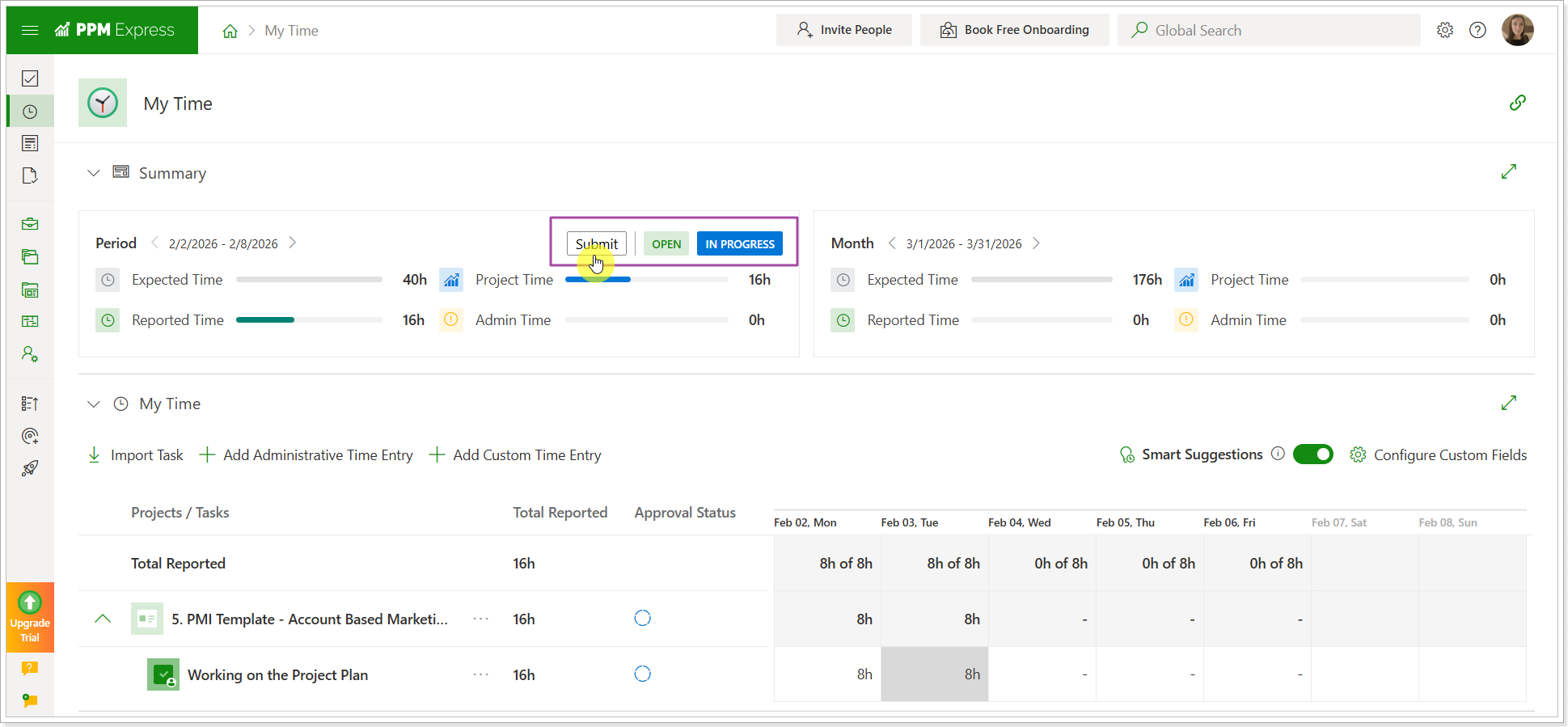
Users report project, non-project, or administrative time through the standard Time Tracking page. As soon as time is entered for a period, the approval status moves to In Progress.
2. Submit for approval
Once all time for the period is logged, the user clicks Submit in the Summary section. The system automatically routes approval requests to the right managers:
- Project time → the Project Manager assigned to the project
- Administrative time → the user's Direct Manager
3. Timesheet locks
After submission, the timesheet is locked and moves to Pending Approval status. The user can't edit it while it's under review. If still pending, they can click Recall to pull it back, make changes, and resubmit.
4. Receive a decision
The user is notified by email whether their time was approved or rejected. If rejected, the email includes the manager's comment. Only rejected entries become editable; approved entries remain locked, so the correction cycle is focused and efficient.
The Approval Center: What Managers See
After submission, reported time appears in the Approval Center, accessible from the left navigation menu. Project Managers and Direct Managers see only the requests relevant to them; Administrators have full visibility across all requests.
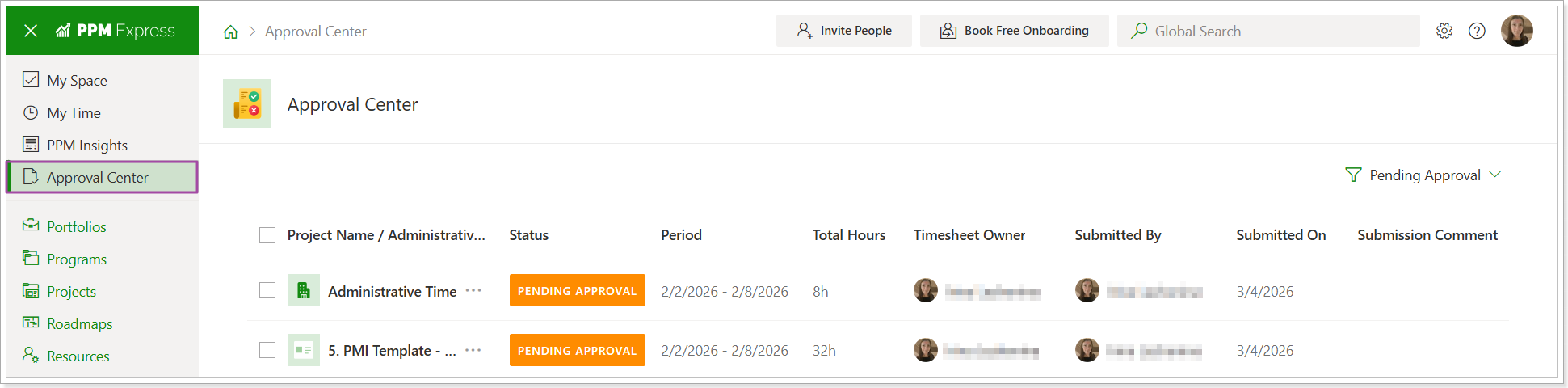
For each submission, managers can see the reporting period, status, total hours, project or admin category, submitter, and dates. They can drill into the detail before deciding, then approve or reject directly from the list. A rejection requires a comment, which is included in the email notification sent to the user.
If multiple managers are assigned to a project, all receive the request, but only one decision is needed to process it.
Automated Email Notifications
PPM Express handles the communication overhead automatically. Administrators configure notification schedules in Time Tracking Settings, and the system takes it from there.
Approvers receive:
- New approval request notifications
- Reminders for pending requests
- Overdue approval alerts
Users receive:
- Reminders to submit timesheets before the deadline
- Overdue submission alerts
- Approval confirmation
- Rejection notification with comments
Users must have "Receive notifications" enabled in their personal settings to receive these emails.
The Bigger Picture: Approved Time You Can Trust
Timesheet Approvals aren't just an administrative checkbox: they're an accuracy layer that makes your entire time tracking investment more valuable.
Think about what flows downstream from time data: project cost reporting, resource utilization analysis, billing to clients, capacity planning for future quarters. If the time entries feeding those processes were never reviewed, every downstream output carries that uncertainty with it. Approval workflows close that loop. When project actuals reflect reviewed, manager-confirmed hours, the data feeding your portfolio dashboards, forecasts, and client reports is data the whole organization can stand behind.
There's also a cultural dimension worth acknowledging. When people know their time submissions will be reviewed, they tend to log more carefully and promptly. The approval workflow creates a natural accountability rhythm (weekly or bi-weekly) that keeps time data current rather than reconstructed at the end of the month from memory.
For organizations moving up from basic time logging (or those replacing manual approval processes in spreadsheets and email chains), PPM Express Timesheet Approvals bring structure without friction. The workflow is lightweight enough for teams to adopt quickly, and robust enough to satisfy audit, compliance, and client reporting requirements as the organization scales.
Ready to enable Timesheet Approvals for your team? Visit your Time Tracking Settings or contact our support team to get started.
PPM Express is a Microsoft-integrated project portfolio management platform designed for teams that need enterprise-grade visibility without the enterprise-grade complexity. Learn more at ppm.express.

.svg)


