


Quick answer: Resource capacity planning is the practice of comparing the work you've committed to against the real, calendar-adjusted hours your people actually have available — not headcount, not a flat 40-hour assumption, but capacity after holidays, part-time schedules, and the slice of every week that never touches a project. The formula behind it is simple — Work Hours × (Max Units / 100) × ((100 − Non-project Work %) / 100) — and the harder problem is what to do once the number comes back negative: reprioritize, hire, or find someone else with the right skill who actually has room.
Most capacity planning content treats this as a math problem. It's really a data-freshness problem: the formula hasn't changed in a decade, but almost every organization is running it against a spreadsheet that was accurate three weeks ago. This guide covers what actually goes into the number, the mistakes that make it wrong, and — the part most guides skip — what to do once you know you're over capacity.
Resource planning vs. resource capacity planning
The two terms get used interchangeably, and that's where a lot of confusion starts. Resource planning is the broader question: who works on what, across which projects, in what sequence. Resource capacity planning is the narrower, harder question underneath it: how much time does each of those people actually have, before you assign any of it away. For the fuller picture of resource planning itself — sequencing, dependencies, and how it fits the wider portfolio — see our complete guide to resource planning.
You can have a perfectly reasonable resource plan — the right people on the right projects, in a sensible order — that's still wrong, because it was built against assumed capacity instead of real capacity. A developer "available" on paper who's actually at 60% because of a part-time arrangement, a regional holiday calendar, and a standing commitment to on-call support isn't available in the way the plan assumes. Capacity planning is what catches that before the assignment is made instead of three weeks into the sprint.
The four inputs that actually drive capacity
Most spreadsheet-based capacity planning gets one of these four wrong, or skips it entirely.
1. The calendar — organization-wide and individual. Every capacity number starts from a calendar, and there are two layers to get right. A global calendar sets the organization's default working hours and company-wide holidays or closures — the baseline everyone inherits. Individual resources then override that default with their own work week and their own exceptions, for a part-time schedule, a regional public holiday, or personal time off. Plan against the global calendar alone and every part-time or distributed team member's capacity is wrong.
2. Hours per day. The default is usually a flat 8, but the real number varies by person and by day — someone working a compressed four-day week, someone on a 6-hour contract, someone whose Fridays are half days. This is the base unit the rest of the calculation runs on, so getting it person-specific rather than organization-flat is what makes everything downstream accurate.
3. Calendar exceptions. Holidays, leave blocks, reduced-hours stretches — each one has a start date, an end date, and often a specific set of days within that range rather than a uniform block. A two-week exception doesn't have to mean the same thing on every day inside it: three days of a public holiday shutdown, five days of "half capacity while onboarding a replacement," say. Miss an exception and capacity is systematically overstated for exactly the people who are about to be least available.
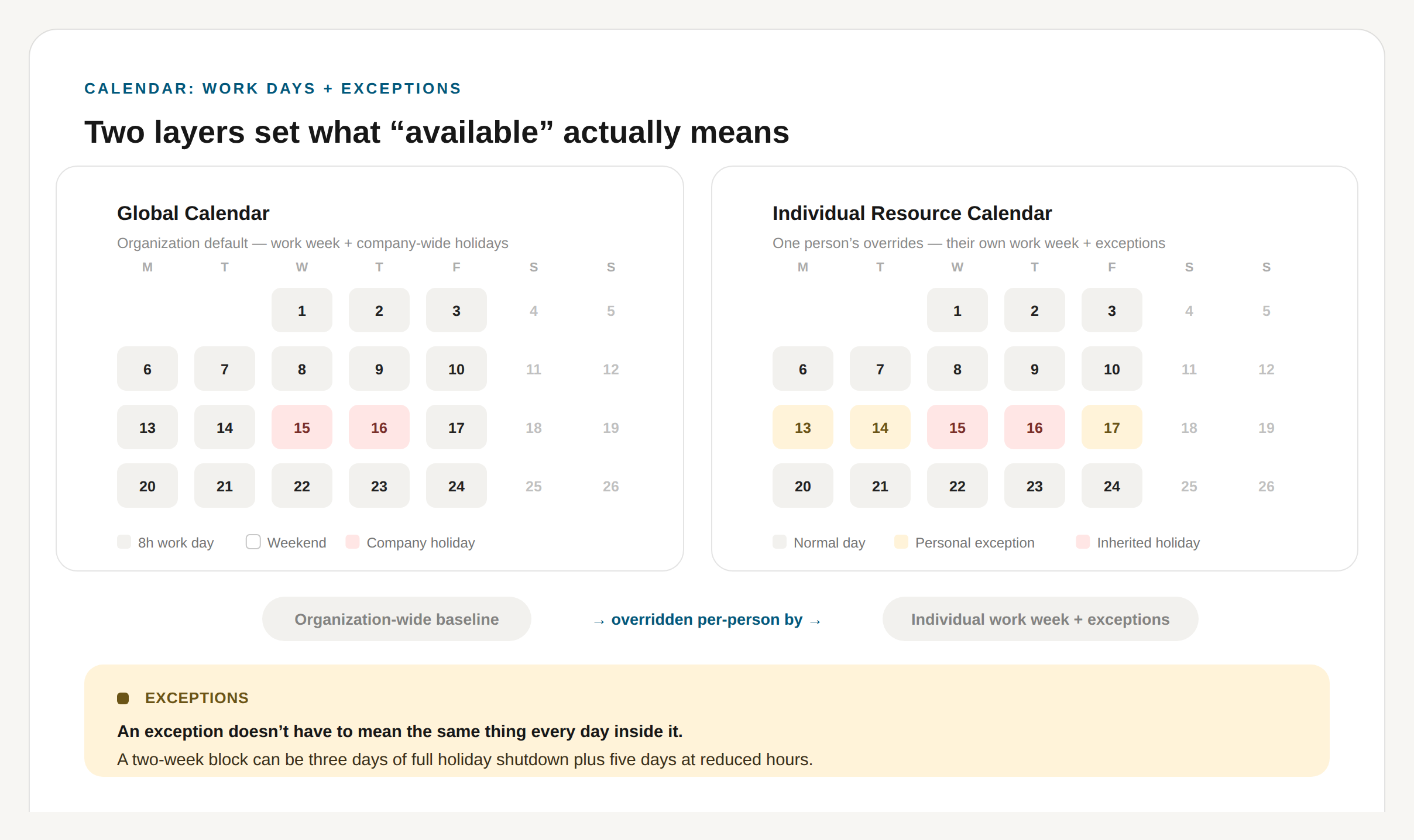
The Global Calendar sets the organization-wide baseline. Each resource's own calendar then overrides it — a personal exception doesn't have to mean the same thing on every day inside it.
4. Non-project time. This is the input almost every spreadsheet leaves out entirely, and it's usually the biggest source of error. Nobody spends 100% of their working hours on assigned project work — there's internal meetings, admin, support tickets, mentoring, the general overhead of being employed somewhere. A resource capacity plan that doesn't reserve a percentage for this before allocating the rest is planning against a number that was never real.
The capacity formula, explained simply
Strip away the tooling and it comes down to one calculation:
Capacity = Work Hours × (Max Units / 100) × ((100 − Non-project Work %) / 100)
Written as percentages that is Work Hours × Max Units % × (100 − Non-project Work %) %, which is the form used in the PPM Express resource capacity documentation. Both express the same thing: a single hour at 50% Max Units with 10% reserved for non-project work is 1 × 0.50 × 0.90 = 0.45 hours of project capacity.
Work Hours is the calendar-adjusted baseline from the four inputs above — hours per day, minus exceptions, for the period you're planning. Max Units % caps how much of that time can be planned at all: 100% for a full-time individual, less for part-time, and — less intuitively — sometimes more than 100% when a "resource" represents a role or a small team rather than one person (a generic "Marketing" placeholder modeled at 300% to represent three people, for instance). Non-project Work % is the reserved slice from input four — the portion of the week that goes to overhead before anything is available to assign.
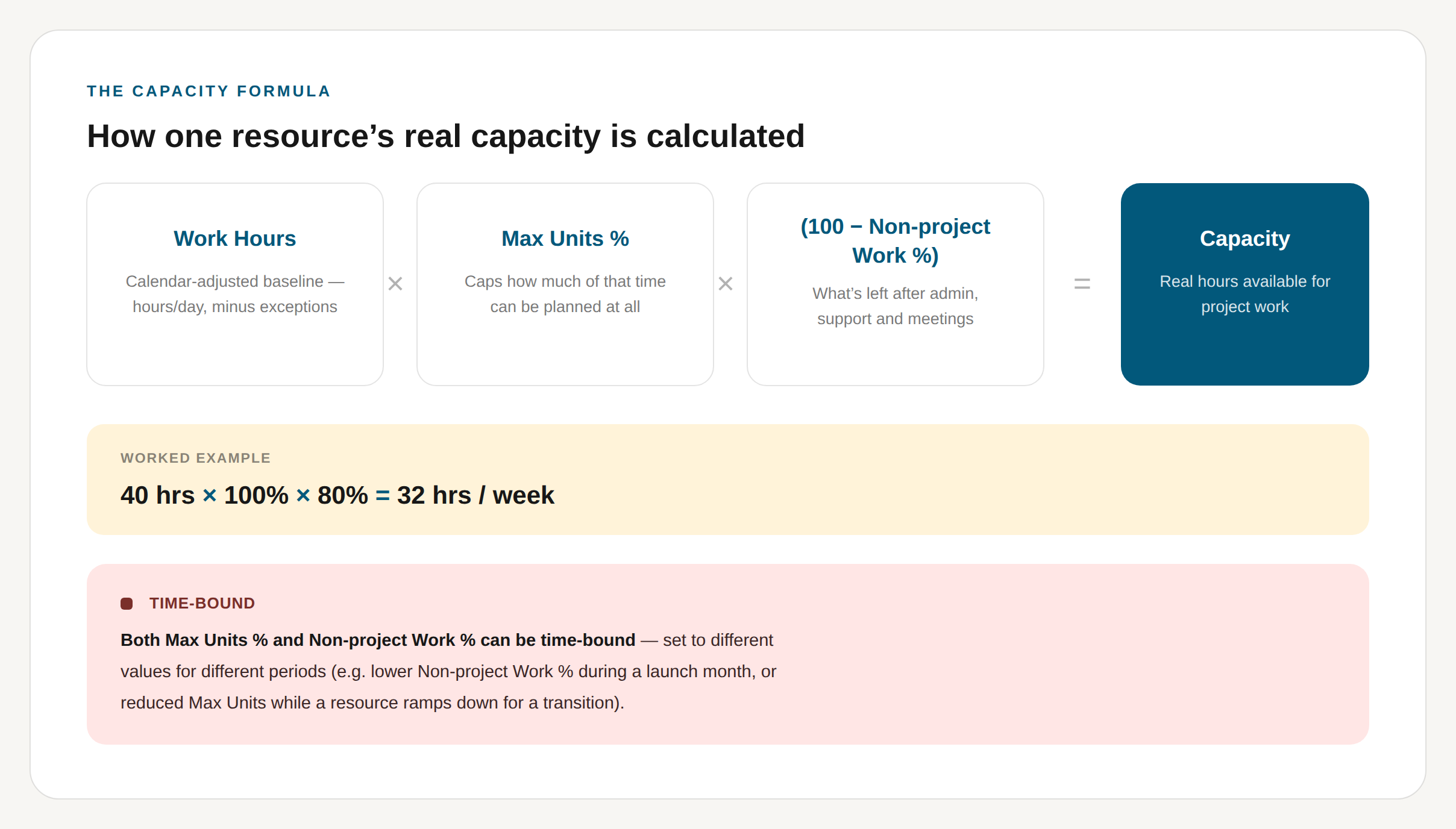
Work Hours, Max Units % and Non-project Work % combine into one real capacity number per resource.
Run a concrete case: someone on a standard 8-hour day, 5-day work week, no exceptions this month, Max Units at 100%, and 20% reserved for non-project work. That's 40 × 1.00 × 0.80 = 32 hours of real weekly capacity — not 40. Plan that person's week against 40 hours instead of 32 and you've built in an 8-hour overallocation before a single project task is assigned.
Neither Max Units % nor Non-project Work % has to stay fixed. Both can be time-bound — set to different values for different periods, like different months — so a resource modeled at 100% Max Units and a 15% non-project reservation in a normal month can be dialed to 30% non-project work during a release crunch, or have Max Units temporarily reduced while they ramp down for a transition. Capacity planning that treats these as fixed constants is planning against a number that's only accurate for one month out of twelve.
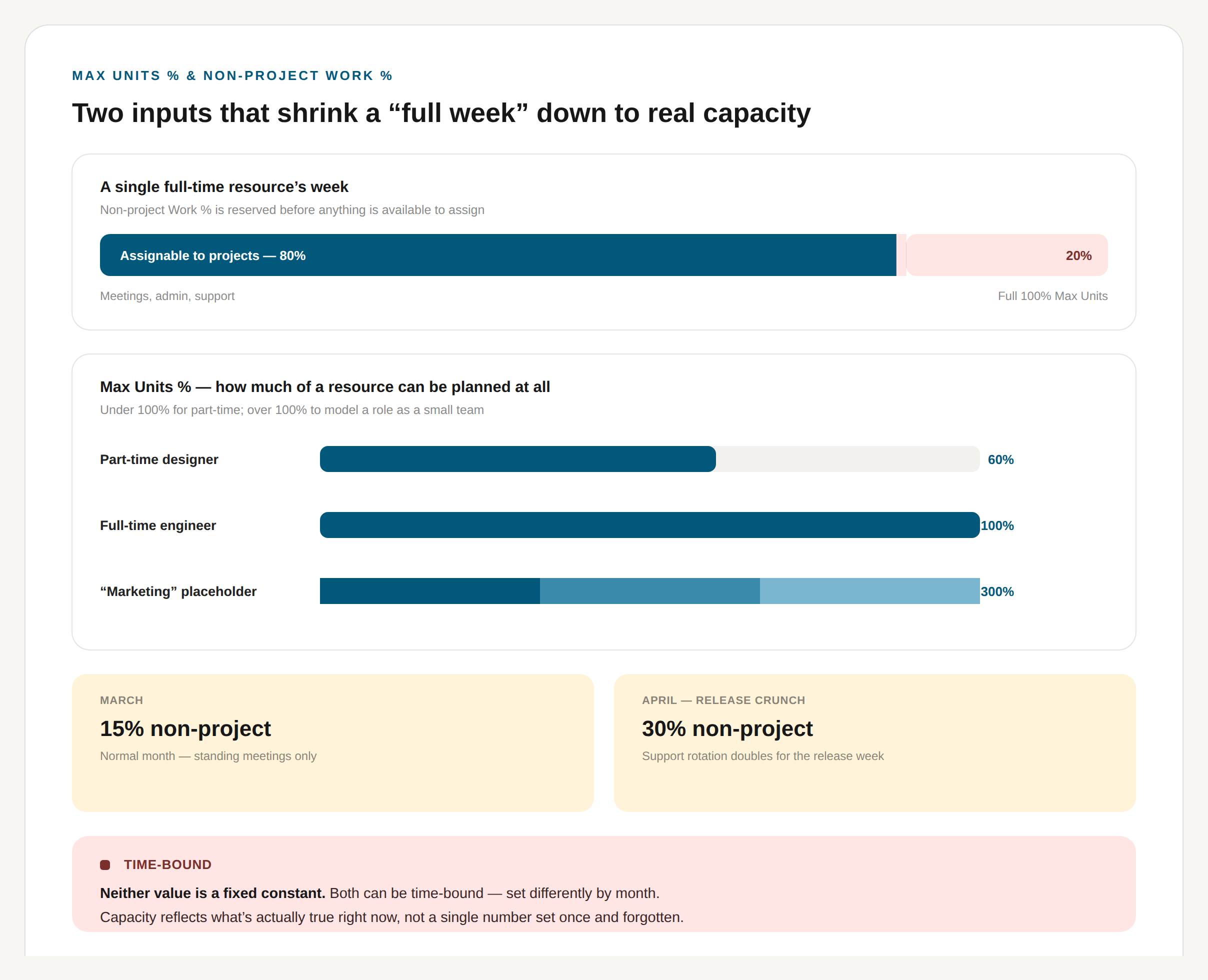
Max Units % caps how much of a resource can be planned at all — under 100% for part-time, over 100% to model a role as a small team. Non-project Work % is reserved before anything else. Both can flex by period.
Resource capacity at different levels
Everything above calculates one resource's number. In practice, capacity planning almost always has to answer the same question at three different altitudes: how much room does this team have, how much of this specific role or skill is available across everyone who holds it, and how is this whole department trending. The formula doesn't change — it still runs person by person — but what you do with the output does.
Capacity at the team level
A team's capacity is not headcount multiplied by a flat number — it's the sum of each member's individually calculated capacity for the period, and that sum shifts every time any one person's calendar, Max Units, or non-project load changes. A five-person team where one person is part-time, one is mid-exception, and everyone carries a 15% non-project load has a real capacity nowhere near "five people × 40 hours" — the worked example later in this guide shows the size of that gap. Team-level planning is about watching that aggregate move in real time as individual inputs change, rather than re-deriving it in a spreadsheet every time someone asks. It's also where utilization becomes the number people actually watch day to day: allocation against team capacity, tracked over a sprint or a month, is what shows whether a team is trending over or under before it becomes a deadline problem. How to Maximize Productivity and Team Utilization With Resource Planning for Jira goes deeper on that day-to-day tracking, and our guide to workload management covers the broader practice of keeping a team's workload matched to what it can actually carry.
Capacity at the role level
Sometimes the unit that matters isn't a named person at all — it's a role or a skill. "How much QA capacity do we have this sprint" and "who else knows the billing integration" are role-level questions, and they're a different calculation than team capacity: instead of summing everyone on one team, you're summing everyone who holds a given role or skill across however many teams they're spread across, then checking who actually has room. This is the same mechanic behind finding a qualified replacement by role or skill when someone's overallocated — it only works if roles and skills are tracked as searchable fields on every resource rather than a note in someone's profile. It's also how a placeholder resource gets modeled in the first place: a generic "Marketing" role planned at 300% Max Units to represent three people is a role-level capacity number before it's ever broken down into named individuals.
Capacity at the department level
Roll up far enough and capacity planning stops being about people and starts being about whether a department can take on the work in front of it. Department-level capacity aggregates every team and role underneath it, and the number that matters most here is rarely the average — it's the spread. A department running at a comfortable 75% utilization overall can still have one team buried and another idle; averaging hides exactly the imbalance a reprioritization or replace-by-skill decision depends on seeing. This is the altitude where capacity planning turns into portfolio-level reporting: the same rollup that tells a PMO whether a new project can even be resourced this quarter, without waiting for every team lead to say so individually. Resource Management Reporting in Modern Workspace: How To and Real Visibility Into Value, Risk, and Capacity both go deeper on that department- and portfolio-level rollup.
Common resource capacity planning mistakes
- Planning against headcount instead of capacity. "We have five engineers" is not a capacity number. Five engineers at varying Max Units, non-project loads, and calendar exceptions might add up to the equivalent of 3.2 full-time engineers of actual assignable time.
- Treating non-project time as a rounding error. It usually isn't. An organization might reserve 20–30% of a resource's working time for support, administration, meetings, and operational responsibilities — a fifth to a third less assignable capacity than headcount alone would suggest.
- Using one calendar for a distributed team. A global calendar with no individual overrides silently gets every regional holiday, every part-time arrangement, and every personal exception wrong, in whichever direction makes the plan look better than it is.
- Checking capacity after the plan is approved, not before. Capacity that's tested only in a monthly report instead of at the point of assignment turns overallocation into an incident instead of a decision.
- Treating overallocation as a report instead of an action. Knowing three people are overallocated in the current plan is not the same as knowing what to do about it — which is the part most capacity planning guides stop short of.
What to do when you're over capacity
This is the section most resource capacity planning content skips, or waves at with "reprioritize the roadmap" and moves on. In practice there are three real levers, and only one of them scales.
Reprioritize or defer. The obvious lever — descope, delay, or cancel lower-value work to free up the capacity the higher-value work needs. It works, but it's a portfolio-level decision, not a resourcing one, and it's slow: it usually means a governance conversation, not a same-day fix.
Hire or contract. The other obvious lever, and the slowest — weeks to months before it changes anything, and it doesn't help with the overallocation that's happening this sprint.
Replace by role or skill. The lever most guides underweight, and the one that actually resolves a same-week capacity problem: find someone else who can do the work and has the room to do it. This depends entirely on whether your resourcing data goes deeper than a name and a title. If a project needs someone who's touched the billing integration, and the only record of who that is lives in someone's memory, the "find a replacement" step becomes a Slack message and a guess. If roles and skills are tracked as searchable, filterable fields on every resource, it becomes an actual query: who else has this skill, and what's their current capacity.
Three developers on paper are rarely interchangeable in practice — one has the domain knowledge, one doesn't, and pretending otherwise is how "we found a replacement" turns into a second onboarding period disguised as a staffing decision. Tracking roles and skills as first-class, searchable fields — not a note in someone's profile — is what makes replacement a genuine third option instead of a hopeful guess. Practically, that means: search or filter resources by role, tag, or skill to find who else is qualified; check their current capacity against the same formula above before committing anything; and if the original resource was already committed to the work, treat the swap as proposed rather than final until someone actually signs off on it — a replacement decided under time pressure shouldn't silently become permanent.
A worked example
A five-person delivery team, mid-sized initiative, six-week push, 40-hour standard week. The assumptions:
- Resource A: 100% Max Units, available all six weeks.
- Resource B: 100% Max Units, available all six weeks.
- Resource C: 100% Max Units, available all six weeks.
- Resource D: 60% Max Units (part-time), available all six weeks.
- Resource E: 100% Max Units, unavailable for two full weeks on a regional holiday calendar exception.
- All five carry a 15% non-project load — standing meetings, support rotation, the usual overhead.
Naive planning treats this as five people × 40 hours × 6 weeks = 1,200 hours. Now run the real formula, person by person, before the non-project reservation:
- A: 40 × 6 = 240 hours
- B: 40 × 6 = 240 hours
- C: 40 × 6 = 240 hours
- D: 40 × 6 × 0.60 = 144 hours
- E: 40 × 4 = 160 hours
That subtotal is 1,024 hours. The part-time team member contributes 40% less than a full-time resource, not 60% — 60% Max Units means 60% of full-time capacity, and mixing those two up is one of the more common ways a capacity model quietly overstates itself. Apply the 15% non-project reservation to the subtotal and real project capacity lands at 1,024 × 0.85 = 870 hours.
So the naive plan overstates available capacity by about 330 hours, or 27.5%. That gap is exactly where "the sprint is behind" surprises come from, and it's fully visible before the plan is approved if the four inputs are accounted for instead of assumed away.
Frequently asked questions
What is resource capacity planning?
The practice of calculating how much time your people genuinely have available for project work — after calendars, exceptions, part-time arrangements, and non-project time are accounted for — and comparing that against what's been committed, before committing more.
How is resource capacity calculated?
Capacity = Work Hours × (Max Units / 100) × ((100 − Non-project Work %) / 100). For example, 8 hours × 50% × 90% = 3.6 hours of project capacity. Work Hours comes from the calendar-adjusted baseline (hours per day, minus exceptions). Max Units caps how much of a person's time can be planned. Non-project Work % reserves the portion that goes to overhead before anything is assignable.
What's the difference between resource planning and resource capacity planning?
Resource planning decides who works on what. Resource capacity planning determines how much time each of those people genuinely has before any of it gets assigned — the input the plan should be built from, not an afterthought checked once the plan already exists.
What's the difference between capacity, allocation, and utilization?
Capacity is how much project-working time is available. Allocation is how much work has been committed against it. Utilization is the relationship between the two — allocation, or actual work, relative to available capacity, depending on which definition a given report uses — and it's usually the number leadership actually asks about.
What should you do when a resource capacity plan shows overallocation?
Three real options: reprioritize or defer lower-value work, hire or contract (slow, but real), or find a replacement by role or skill who has the room — the fastest lever, and the one that depends entirely on whether skills are tracked as searchable data rather than institutional memory.
The short version
Resource capacity planning isn't a harder version of resource planning — it's the input resource planning should be built on top of, not a check run after the fact. Get the four inputs right (calendars at both the organization and individual level, hours per day, exceptions, and non-project time), and the formula does the rest: Work Hours × (Max Units / 100) × ((100 − Non-project Work %) / 100). The part worth taking seriously that most guides skip is what happens when that number comes back negative — reprioritizing and hiring both work, but they're slow. Finding a qualified replacement with real room on their plate is the lever that resolves this week's problem this week, and it only works if roles and skills are tracked well enough to actually query them.
This is the exact mechanic behind resource capacity planning in PPM Express — calendars, exceptions, Max Units and non-project time feeding one real capacity number per person, tested against allocation before a plan is committed, with role- and skill-based search built in for the moment a replacement is the fastest way forward. If reconciling "the plan" against "who's actually free" is a recurring fire drill, it's worth a look.


.svg)


