

Quick answer: Microsoft Planner has no budget, cost, or benefit-tracking fields anywhere in the product. That's true in Basic, in Premium, and behind every licence tier. If you're searching for native Microsoft Planner budget tracking, it simply doesn't exist in the product today. Every dollar figure you have ever seen sitting next to a Planner plan was typed in by a person, copied from a spreadsheet, or reconciled from a separate finance system after the fact. None of it came from Planner. Honest financial management for Planner means giving that manually-sourced data a consistent, structured home next to the work, not pretending Planner can generate it on its own.
What Planner tracks, and what it flatly does not
Microsoft Planner is a task tool, and a good one. A plan holds buckets, tasks, assignments, due dates, checklists, labels, attachments, and comments. Planner Premium (Plan 1, 3, or 5 licensing) adds Timeline view, People view for workload-by-person, sprints, task dependencies, and custom fields, on top of everything in Basic. All of that genuinely improves how a team sees its schedule and its workload.
None of it touches money. There is no field for an approved budget, no field for actual cost, no forecast, no benefit or ROI figure, and no concept of a rate card or labor cost anywhere in Planner's data model, in either edition. This is not an oversight Microsoft is expected to fix; it reflects what Planner is built to be: a lightweight task board for a team, not a financial system of record.
It is easy to paper over this with a custom field. Premium lets you add a custom field and name it "Budget" or "Est. Cost." That field can hold a number, but it is just a labeled cell. Nothing validates the number, nothing reconciles it against an invoice or a timesheet, nothing rolls it up across plans, and nothing distinguishes a planning estimate from money actually spent. A custom field that looks financial is still, structurally, exactly as blank as every other field in Planner until a person fills it in and keeps filling it in.
Planner does not generate cost data. A person always has to put it there.
Where budget numbers actually come from today
If you manage projects in Planner and your organization needs to know what something costs, the number is coming from one of three places, and none of them is Planner itself.
1. A parallel spreadsheet. This is the default for most teams running project financial management on top of Planner. Someone keeps a workbook, often built from a budget tracking template, with approved amounts by category, and updates it by hand as invoices and time entries come in. It works, but it lives entirely outside Planner: nobody looking at the plan sees the budget, and nobody looking at the budget sees whether the underlying tasks are on schedule. The two views drift apart the moment either one is updated without the other.
2. A separate finance or PPM tool. Larger organizations often run actual cost through a finance system: expense management, an ERP, or a timesheet tool with billing rates. They then manually copy or export summary figures back into a status update or a portfolio-level tracker. This is more rigorous than a shared spreadsheet, but it is still a manual bridge: someone has to pull the export, match it to the right project, and re-key it wherever project stakeholders actually look.
3. Nothing at all. A large share of Planner-based teams simply do not track cost at the project level. Schedule and task status get real attention because Planner surfaces them well; the financial side gets a rough verbal estimate at a monthly check-in, if that. For a single team coordinating its own work, that gap may be tolerable. For a PMO trying to answer "which of our thirty initiatives are actually within budget," it isn't.
All three paths land in the same place: correct financial visibility on top of Planner, when it exists at all, is manually assembled and manually maintained. That is the honest starting point for any conversation about project budget tracking software layered over Planner.
What "financial management for Planner" can honestly mean
Given that Planner holds no cost data natively, the realistic promise of a tool that adds financial management on top of it is narrower than the phrase might suggest. It is not automated cost capture. Nothing reads an invoice or a payroll system and drops a verified actual into a project without a human confirming it, and any vendor implying otherwise is describing a roadmap item, not a shipping feature. What it can honestly mean is two things: a consistent, structured place to enter and hold budget and actual figures next to the Planner work they belong to, and a clear, comparable status (on budget, at risk, or over budget) calculated from whatever numbers have been entered, rather than eyeballed project by project.
That is a meaningful step up from a spreadsheet nobody outside finance opens, even though it still depends entirely on someone entering the approved budget and periodically entering or reconciling the actual. The value is structure and consistency across a portfolio of Planner plans, not automation the underlying data doesn't support yet. If you are evaluating project financial management software specifically for a Planner-based organization, this distinction, structured manual entry versus automated capture, is the single question worth asking every vendor directly.
A worked example
Here is what that structure looks like in practice: one project, its approved budget by category, the actual cost as reconciled by a PMO analyst at month-end from invoices and a contractor timesheet export, and the resulting variance.
Internal labor. Approved budget $62,000; actual cost (reconciled) $58,400; variance +$3,600.
External contractors. Approved budget $40,000; actual cost (reconciled) $46,250; variance −$6,250.
Software / licensing. Approved budget $8,500; actual cost (reconciled) $8,500; variance $0.
Contingency. Approved budget $9,500; actual cost (reconciled) $2,100; variance +$7,400.
Total. Approved budget $120,000; actual cost (reconciled) $115,250; variance +$4,750.
Every number in that table came from a person: the approved budget was entered at project approval, and the actual column was assembled by reconciling contractor invoices and a timesheet export. None of it was pulled automatically from the eleven Planner tasks this project is tracked in. Planner shows whether those tasks are done, late, or blocked; it has no way to know the contractor line ran $6,250 over. That reconciliation, and the judgment about whether a 4% net favorable variance is worth flagging to a sponsor, still happens outside the plan. The only question is whether it happens in an ad hoc spreadsheet or somewhere a PMO can see it across every project at once.
How PPM Express adds financial management on top of Planner
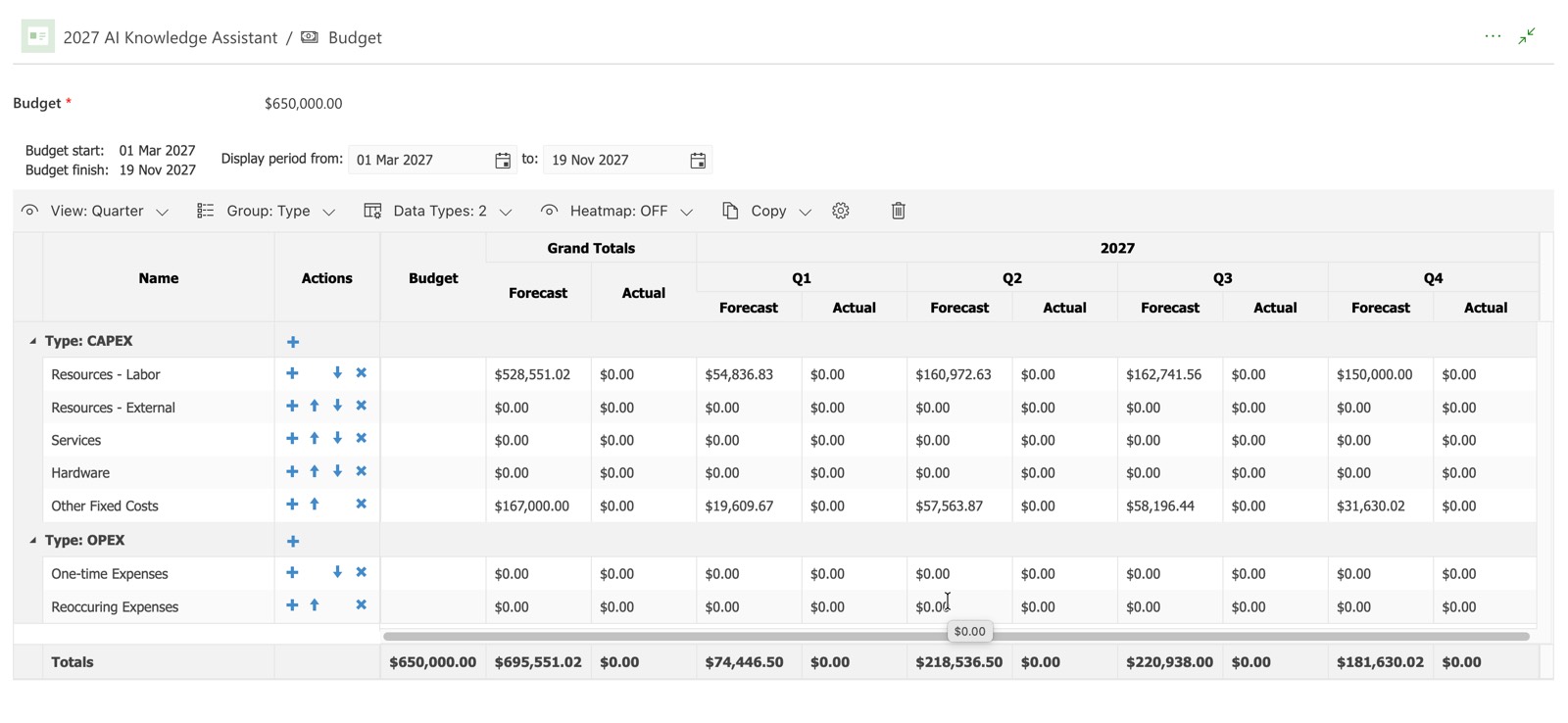
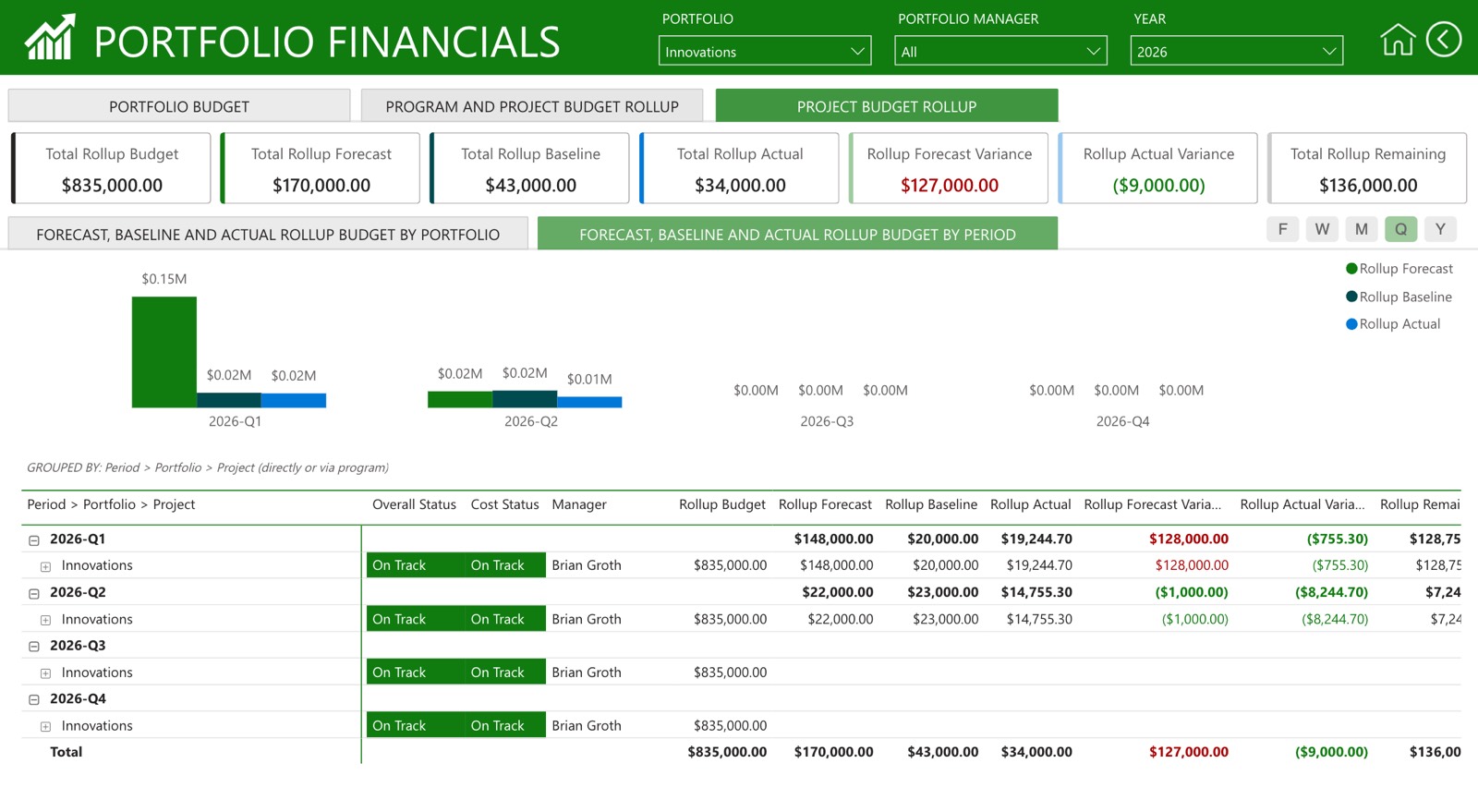
PPM Express connects to Microsoft Planner and gives you a cross-plan portfolio view, status reporting, and owned risk and issue records that Planner itself has no fields for. Financial management builds on top of that same connection: structured budget-health status and manually-entered budget-versus-actual tracking, of the kind shown in the table above, along with deeper financial and benefit-realization capability built for organizations that need to report cost consistently across a real portfolio, not just one project.
Verified financial reporting requires someone with budget authority defining categories, approving figures, and reviewing variance on a cadence — that's the governance PPM Express's financial and benefit-realization capability is built to support. Worth flagging plainly: an automated Financial Forecast Manager add-on is publicly listed as coming soon on PPM Express's pricing page and is not available today, so nothing here should be read as forecasting cost automatically. What's available now is structure: consistent categories, a repeatable status calculation, and one place a PMO can see budget health across every Planner-based project it owns, instead of stitching that picture together from a dozen spreadsheets. For more on what disciplined budget tracking should include, see the project budget tracking guide.
Financial Module
Financial Reporting
Frequently asked questions
Does Microsoft Planner have any budget or cost fields at all?
No, in neither Basic nor Premium/Plan 1/3/5. Premium's custom fields can hold a number you label "Budget," but that is an unvalidated text or number field, not a financial system. Nothing reconciles it, rolls it up, or distinguishes a plan from an actual.
If I connect Planner to a PPM or reporting tool, does that automatically create real cost data?
No. Connecting a tool to Planner brings over what Planner has: tasks, dates, assignments, status. None of that is financial. Any budget or actual-cost figure you see afterward still had to be entered by a person, whether directly, through a connected timesheet, or through a rate table applied to logged hours. No integration invents cost data Planner never had.
What's the difference between Planner Premium's Portfolios and financial reporting?
Portfolios, available on Plan 3/5, give shared read-only visibility across several Premium plans, but Microsoft's own documentation is clear that a Portfolio rolls up tasks. It holds no budget, cost, or benefit data, and Basic plans can't be included at all.
Can I just build this myself with a Planner-connected spreadsheet?
Yes, and many organizations do. It's option one in this article for a reason. It costs nothing beyond the person-hours to maintain it, but it lives outside Planner entirely, doesn't scale past a handful of projects without becoming its own maintenance burden, and depends on one person remembering to keep it current.
Is financial tracking available as soon as you connect Planner to PPM Express?
Not automatically. Cross-plan portfolio views, status reporting, risk and issue tracking, and resource planning are available as soon as you connect a plan. Financial tracking is set up separately, because structured budget and actual-cost data needs a budget owner to define categories, approve figures, and review variance — governance that has to be configured, not something a connection turns on by itself.
Will this ever be automatic?
Not with Planner as the data source alone, since Planner has no financial fields to read from. Automated cost forecasting is on PPM Express's roadmap as a "coming soon" add-on, but it isn't available today. Any current claim of automated financial capture on top of Planner, from any vendor, should be treated with skepticism.
If you're already reconciling Planner-based project spend by hand (a spreadsheet here, a finance export there, a monthly scramble to answer "are we over budget"), that's exactly the gap PPM Express's structured financial and benefit tracking is built to close, and it's worth a conversation if that sounds like where you are today. You can see what's included at ppm.express/financials-and-benefit-realization.
.svg)


