

First, three tools from last year’s list are gone
We published a version of this list in 2025. Before adding anything new, it is worth saying what happened to the old one, because it tells you more about this market than any feature comparison will.
Forecast, which we ranked first, no longer exists as a brand. Accelo acquired it in 2025 and announced the completed brand and website integration on 28 May 2026; forecast.app now redirects to Accelo.com, and Forecast’s predictive engine sits inside Accelo’s PSA platform.
Clockwise stopped working on 27 March 2026. The team joined Salesforce, the product was switched off, and customer data was deleted rather than transferred. Migrating teams were pointed at Reclaim.ai.
Height, which never made our list but was widely recommended elsewhere as “the autonomous project management tool,” shut down on 24 September 2025 after roughly three and a half years.
Three products, three different endings, eighteen months. If you are choosing a tool this year on the strength of its AI demo, that is the risk you are actually underwriting. The demos are all good now. Some of the companies will not be here in 2028.
How this comparison was verified
We reviewed vendor product documentation, release notes, published pricing pages, and analyst materials where they are publicly available. AI capabilities were counted only where we could identify a shipped or documented capability, not a roadmap-only announcement. Where a capability is in beta or preview rather than generally available, we say so. Pricing and product capabilities were last verified in September 2026 and change frequently. Rankings and comparative judgments are PPM Express editorial assessments against the criteria set out below — PPM Express is a vendor in this market, and this article includes our own product.
What counts as an AI project management tool now
The bar moved. In 2025, “AI project management” mostly meant a model writing a shorter version of something you already had — a status summary from task updates, a digest of the week, a tidied-up risk log. Useful, and it saved project managers real hours. It did not change any decisions.
The 2026 question is narrower: can it act?
An assistant answers a question. An agent changes something — updates a field, moves a stage, routes a request, reassigns work, opens a ticket. That difference is where the value is, and it is also where the governance problems start, which is why the honest vendors gate it behind approval and the less honest ones do not mention it.
One caveat before the list. Agentic capability is an evaluation dimension, not a maturity score. Plenty of enterprises deliberately restrict autonomous action for governance, compliance or operational-risk reasons, and for them controlled assistance with strong approvals and an audit trail is the better answer, not the lesser one.
So the test we applied to every tool below:
- Does it ship agents that take actions, generally available, not in a waitlist?
- Is the AI grounded in your actual work data, or is it a chat window bolted to the side?
- Can external assistants reach it? A published MCP server has quietly become the mark of a vendor that expects you to use Claude, ChatGPT or Copilot as a front door rather than fighting it.
- What does the AI cost on top of the seat price? Almost always something. Almost never on the pricing page you first land on.
One tool failed the first test badly enough to leave it off entirely. Smartsheet’s “Smart Agents” — including a Project Manager agent — were still listed as coming soon as of August 2026, nearly a year after the November 2025 announcement. Everything else in Smartsheet’s AI line-up is assistive. It is a strong platform; on this particular criterion it is behind.
The 10 best AI project management tools in 2026
1. ClickUp — best all-in-one AI
ClickUp launched Brain2 on 17 June 2026, and by the breadth of what it shipped it is among the most aggressive AI builds in this category. It routes across Claude, GPT and Gemini rather than betting on one model, and it ships AI Super Agents shaped around roles — Project Manager, Engineering Lead, Agency Owner — plus Brain MAX, a standalone desktop and mobile app with voice input that manages agents outside the main workspace.
Pricing: Free Forever; Unlimited $7/user/month annual; Business $12; Enterprise custom. AI is separate: Brain AI $9/user/month or Everything AI $28/user/month, each with a monthly credit allowance and paid overage.
The catch: the same breadth that makes ClickUp good value makes it hard to roll out. Every serious review from the last year lands on the same two words — bloat and learning curve. And administrators cannot currently set AI usage limits below the workspace level, which matters when credits are metered.
Best for: teams that want one platform, and have someone willing to own the configuration.
2. Asana — best for cross-functional AI workflows
Asana’s bet is that AI belongs inside the workflow rather than beside it. AI Studio lets you build no-code automations for intake, routing and updates; AI Teammates are agents you add from a gallery; Dash gives each person a morning briefing of what actually needs them. In May 2026 it added AI Connectors, so you can drive Asana from Claude, ChatGPT or Gemini. It acquired StackAI in May 2026 for around $75M to pull agent-building in-house.
Asana was named a Leader in The Forrester Wave: Collaborative Work Management Tools, Q2 2025, with top possible scores in nine criteria.
Pricing: Personal free up to 2 users; Starter $10.99/user/month annual; Advanced $24.99; Enterprise and Enterprise+ on request. AI Studio credits are pooled per billing account — 50,000 a month on Starter, 200,000 on Enterprise.
The catch: Asana is deliberately conservative about autonomy. CEO Dan Rogers has put it as “Everyone is building autonomous agents, but autonomy is the wrong goal.” That is a defensible position, and it also means Asana’s agents do less on their own than Wrike’s. Credit costs climb quickly once several are running.
Best for: cross-functional operations teams where the work crosses department lines.
3. Wrike — best for agents that act on their own
Wrike shipped AI Agents to general availability on 5 February 2026, across Business, Pinnacle and Apex plans. Not a beta, not a waitlist. Prebuilt agents cover risk status reporting, triage and intake; a conversational Agent Builder covers the rest. They classify and route work, update fields, email external addresses and post to Slack or Teams, typically in a few seconds. Multi-action agents landed in the February 2026 release. Wrike has shipped an MCP Server since June 2025, and in April 2026 published it to the OpenAI GPT Store — one of the earliest in this category.
Wrike was named a Visionary in the 2026 Gartner Magic Quadrant for Adaptive Project Management and Reporting — its fourth consecutive year in that report.
Pricing: Free; Team $10/user/month (2–15 users); Business $25/user/month (5–200 users); Pinnacle and Apex on request. Note the seat ceiling — anything genuinely large is on custom pricing.
The catch: AI is metered in “AI Elite actions” with Pinnacle at 3× and Apex at 10× the Business allowance, so heavy use pushes you up a tier. G2 sits at 4.2 from around 4,500 reviews, and the loudest complaint by volume is the learning curve. The legacy Enterprise plan stopped being available for purchase on 20 January 2026, replaced by Pinnacle and Apex — worth knowing if you are reading older comparisons.
Best for: operations teams that want agents doing real work today rather than next quarter.
4. monday.com — best for visual workflow AI
monday now describes itself as an AI work platform, and G2 lists the product under that name. The AI is assembled from parts you can see: AI Blocks that categorise, extract, summarise and score sentiment inside columns and automations; monday magic, which turns a prompt into a fully built board with demo data; sidekick as the in-product assistant; and an Agent Factory alongside prebuilt agents for market analysis, vendor scouting, status reporting and drift detection.
monday.com was a Leader in the 2025 Gartner Magic Quadrant for Adaptive Project Management and Reporting, its fourth consecutive year, and is among the vendors evaluated in the 2026 report.
Pricing: Free for 2 seats; Basic $9/seat/month; Standard $12; Pro $19; Enterprise custom. AI credits scale with the tier — 1,000 a month on Basic, 3,000 on Pro.
The catch: portfolio management — the cross-project view — is Enterprise-only, and behind it there is no financial tracking, no scenario planning and no stage gates. The credit allowance on Basic is thin enough that any real agent use pushes you to Standard or Pro in practice.
Best for: teams that think visually and want AI they can point at.
5. PPM Express — best for AI across a multi-tool portfolio
Every tool above applies AI inside its own data. That works until your projects live in six systems. In larger organisations, project and delivery data is often distributed across Jira, Azure DevOps, Microsoft Planner, Microsoft Project, Smartsheet and a layer of spreadsheets underneath all of it.
PPM Express takes the other approach. It aggregates projects from Azure DevOps, Jira, Microsoft Project, Microsoft Planner, Project Online, Smartsheet and monday.com into one live portfolio, then runs the AI over all of it. Four distinct mechanisms are worth separating, because they behave differently. Insights AI surfaces portfolio-level signals that need a project manager’s attention — new risks, slipping milestones, overallocation — with generation triggered by a user action or a project synchronisation rather than running in the background. AI status reports are generated from live project data rather than from what someone remembered to type. MCP access from Microsoft 365 Copilot, Anthropic Claude and OpenAI ChatGPT means a portfolio lead can ask questions in whichever assistant they already use. And AI Agents, on the PPM AI plan, are the piece that monitors continuously — schedules, budgets, risks and resource allocation across the portfolio — proposing new risks, issues, action items and schedule changes that a project manager approves or rejects. Nothing executes because a model decided it should.
The reason this belongs on a list of AI tools rather than only a portfolio list is coverage. A summary of the whole portfolio and a summary of one connected tool read identically, and nothing in the output tells you which one you are holding.
Pricing: Enterprise $8,000 a year, Ultra $25,000 a year, both with unlimited users and guests; a third PPM AI tier is priced on request and adds implementation services around the agents. Flat-rate rather than per-seat, which at a few hundred users works out substantially below per-seat enterprise pricing. 30-day trial, 30-day refund.
The catch: it is a governance and portfolio layer, not a place for a team to run their daily work — that stays in your existing tools, by design. AI agents and the Copilot integration are provisioned on request rather than switched on self-serve, so build that into your timeline. And unlike several names here, PPM Express holds no Gartner or Forrester placement, so you are evaluating it on the product rather than on an analyst’s say-so.
Best for: PMOs running projects across several delivery tools that want one AI view over all of them. If you are being pushed off Project Online this September, it is a direct landing spot.
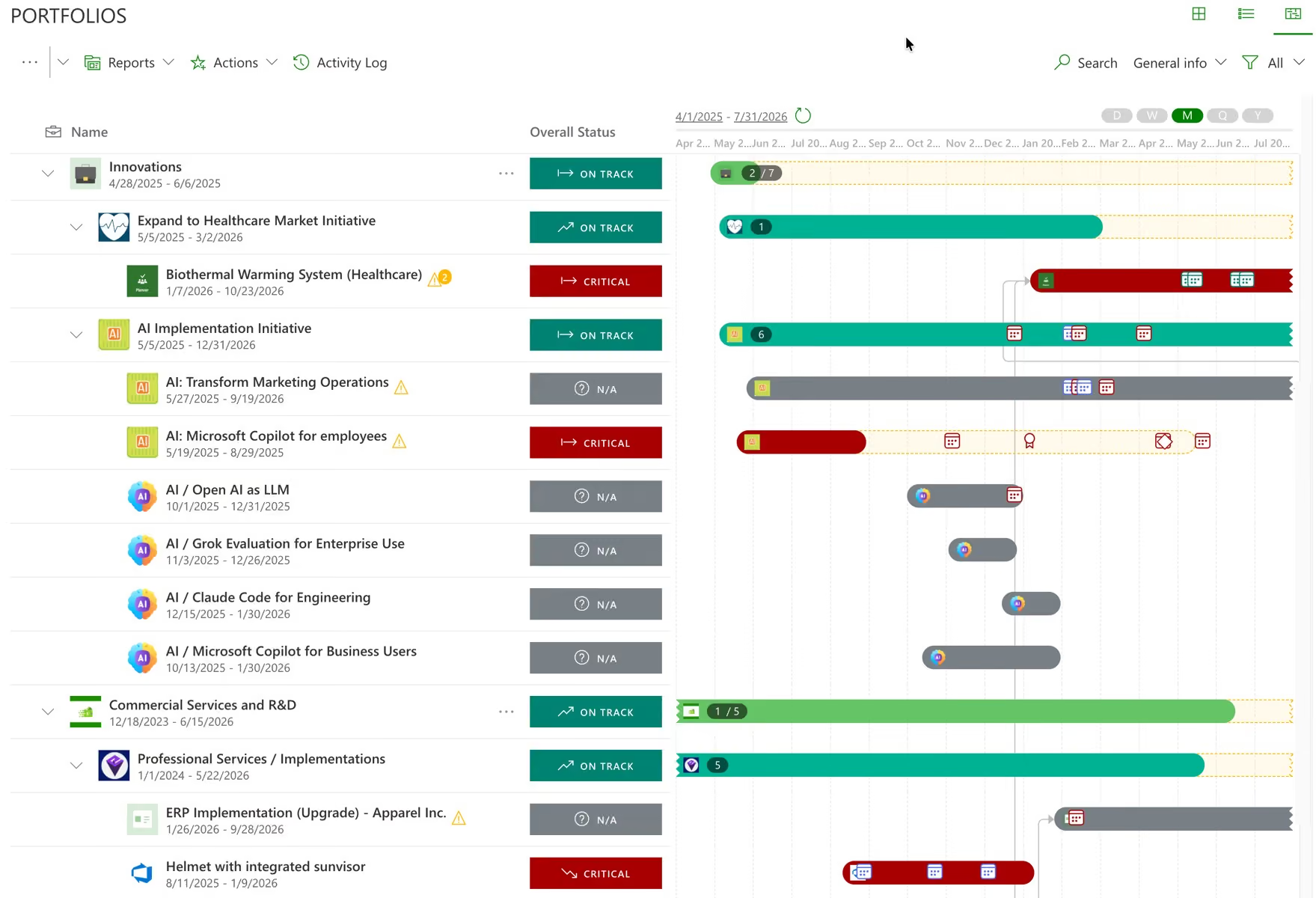
One portfolio assembled from the tools the teams already run. See portfolio visibility and the connectors behind it.
6. Atlassian Jira with Rovo — best for software teams at scale
Rovo is now bundled into paid Jira plans rather than sold separately. It covers search across the Teamwork Graph, a chat that creates tickets and schedules meetings, a Deep Research mode that produces cited reports, always-on agents for backlog analysis, alert triage and root-cause work, and Rovo Studio for building agents from a prompt.
Atlassian was named a Strong Performer in The Forrester Wave: Strategic Portfolio Management Tools, Q2 2026, scoring 5 out of 5 for Vision and Innovation.
Pricing: roughly $7–8/user/month on Standard and $14–15 on Premium, free for up to 10 users.
The catch: read the credit maths before committing. Rovo credits are pooled monthly with no rollover: 25 per user on Standard, 70 on Premium, 150 on Enterprise. An agent request costs 10 credits and a Deep Research query costs 100. A Standard user exhausts their monthly allowance in under three agent runs.
Best for: engineering organisations already standardised on Atlassian.
7. Microsoft Planner with Copilot — best inside Microsoft 365
The Planner Agent — renamed from Project Manager agent in March 2026 — began its general availability rollout that month and completed it by the end of May, extending from premium-only to both premium and basic group plans for users with a Copilot licence. It generates first-draft task output, tracks progress, refines iteratively, and produces status reports from plan data.
There is a much larger story here. Microsoft Project Online retires on 30 September 2026. New Project Web App sites have been blocked since 1 April, and SharePoint 2013 workflows — which carried stage gates and approvals — stopped working on 2 April. Separately, Project Server 2019 mainstream support ended on 9 January 2024, and extended support ended on 14 July 2026, so the on-premises product is now out of support entirely. Microsoft’s own stated reason for the Project Online retirement is that the legacy architecture could not support modern cloud and AI work. Check Microsoft’s lifecycle documentation for exactly what happens to PWA and the OData API after the retirement date rather than relying on secondhand summaries, this one included.
Pricing: Planner is included with Microsoft 365 but with no AI. Planner Plan 1 is $10/user/month annual; Planner and Project Plan 3 is $30. The AI requires a Microsoft 365 Copilot licence at $30/user/month. Realistically, AI-capable Planner is $40 a user a month — the highest per-user list price of any option on this list.
The catch: Planner Premium is a capable team planner, but its Portfolios feature cannot connect Azure DevOps or Project Online projects, carries one baseline where Project Online had eleven, has no financial tracking, no budgets, no resource allocation and no stage-gate engine, and tops out around 3,000 tasks per plan.
Best for: organisations already paying for Microsoft 365 Copilot whose planning needs stop at the team.
8. Notion — best for AI over documents and knowledge
Notion 3.0 shipped Agents in September 2025, and Custom Agents — team-wide, scheduled or triggered, running with nobody watching — followed. They create and edit pages and databases using workspace context plus connected apps, search across Slack and Google Drive, and turn meeting recordings into notes and actions.
Pricing: Free; Plus $10/member/month; Business $20; Enterprise custom. Custom Agents were free to try until 3 May 2026 and now consume credits, sold at $10 per 1,000.
The catch: Notion is a superb knowledge system and a weak project system. No real Gantt, no resource management, no capacity view. Teams that adopt it as their project tool usually end up rebuilding those things by hand.
Best for: knowledge-heavy teams where the document is the project.
9. Linear — best for engineering teams
Linear shipped coding sessions on 11 June 2026: the Linear Agent writes code using Claude Code and Codex, running in the cloud against issues assigned to it. Linear says it uses this workflow internally to resolve roughly 30% of incoming bug reports, mostly on the first pass. That is a vendor-reported figure about a subset of issues, and “mostly” is doing some work in the sentence — but it is still the most concrete outcome claim anyone in this category has published.
Pricing: Free with unlimited members, 2 teams and 250 issues — and notably, the Agent platform is included on the free tier. Basic $10/user/month annual; Business $16; Enterprise custom. Coding sessions consume separately purchased AI credits.
The catch: it is built for software teams and makes no apology for it. Marketing, HR and finance will not be happy here.
Best for: engineering organisations that want agents closing issues rather than summarising them.
10. Adobe Workfront — best for enterprise marketing operations
Workfront’s AI Collaborators went generally available on 13 August 2026 — and, unusually, at no additional cost to existing customers. Three agent types: a content reviewer that checks documents against brand guidelines, a project coordinator that tracks progress and updates stakeholders, and task agents that connect Anthropic Claude, Microsoft Copilot Studio and Writer so external AI can be assigned work as a resource. A Workfront MCP Server reached full production on 16 July 2026, with EU instance support.
Forrester’s Jessica Liu offered the most useful caution of the year on that launch: automation helps efficiency, but “it’s very difficult to automate a process or workflow that is broken or non-existent.”
Pricing: Select, Prime and Ultimate tiers, none publicly priced. Portfolio management starts at Prime.
The catch: this is marketing and creative operations software. It is excellent at that and not built for IT or engineering portfolios. G2 sits at 4.1, with performance on large datasets a recurring complaint.
Best for: enterprise marketing teams already inside Adobe.
What the pricing pages do not tell you
Here is the thing that will surprise your finance team. In 2026, AI is metered almost everywhere. The seat price you compare across vendors is not the price you will pay.
| Tool | Seat price from | How the AI is charged |
|---|---|---|
| ClickUp | $7/user/mo | Separate AI plan at $9 or $28/user/mo, plus credit overage |
| Asana | $10.99/user/mo | Credit pool per account, 50K–200K/month by tier |
| Wrike | $10/user/mo | “AI Elite actions” quota; higher tiers get 3× and 10× |
| monday.com | $9/seat/mo | AI credits, 1,000–3,000/month by tier |
| PPM Express | $8,000/year flat | No metering; unlimited users. Agents and Copilot provisioned on request |
| Jira + Rovo | ~$7–8/user/mo | Rovo credits, 25–150/user/month; 10 per agent request |
| Planner + Copilot | $10/user/mo | Requires M365 Copilot at $30/user/mo |
| Notion | $10/member/mo* | Credits; Custom Agents $10 per 1,000 |
| Linear | $10/user/mo | Separately purchased AI credits |
| Adobe Workfront | Not published | AI Collaborators included; third-party models may bill separately |
Seat prices are annual-billing rates except Notion, which publishes monthly. Rates last checked September 2026 — confirm current pricing before budgeting, because several of these changed during the year.
Two implications worth taking into a budget conversation. First, the cheapest seat price is frequently not the cheapest deployment once agents are running daily — credits are consumed by usage, and usage is the entire point. Second, metered AI creates an awkward incentive: the more useful the agents become, the more it costs to let people use them. Ask every vendor what a heavy user actually consumes in a month, and get it in writing.
One more thing to diary. Teamwork.com’s AI is free during an introductory period that ends when usage-based credits launch in September 2026. Any comparison you read that says “Teamwork includes AI at no cost” is about to be wrong.
How to choose without regretting it in six months
Five questions, in the order that matters.
Where does your work actually live? If it is genuinely in one tool, buy the best AI inside that tool. If it is spread across Jira, Azure DevOps, Planner and three spreadsheets, no single-tool AI can see your portfolio, and a summary built on part of it will read exactly as confident as one built on all of it.
Do you need agents that act, or assistants that answer? Be honest. Most organisations get most of the value from the second, at a fraction of the governance overhead. If the answer is act, check the read/write boundary and the approval step before you check the feature list.
Whose identity does the AI act under? An agent running on a service account with broad rights has quietly removed the permission model you spent years building. An agent that acts as the signed-in user has not. This is the single most useful question to ask a vendor, and the one they are least often asked.
What happens when the model changes? Your vendor will update the underlying model, probably without a changelog you can map to your risk assessment. Ask how you will find out.
Will they be here in three years? See the top of this article.
Where this is heading
Model capability is converging, and quickly. The gap between what the best and the median AI can do inside a project tool is narrowing every quarter, which means it will stop being a differentiator sooner than the marketing suggests.
What will still be hard in 2028 is the unglamorous part: whether the data the AI reads is complete, consistently defined, current, and traceable back to a record someone can open. A model reasoning over a partial portfolio produces beautifully written, confidently wrong answers, and nothing on the surface of the output tells you which kind you are looking at.
Pick for the substrate, not the demo.
PPM Express gives PMOs one live portfolio built from the delivery tools their teams already use, with AI insights, automated status reports and conversational access through Claude, ChatGPT and Microsoft 365 Copilot — for a flat annual fee with unlimited users. See how it compares, or start a 30-day trial.
Analyst placements, pricing and product capabilities cited in this article were last verified in September 2026. Vendors change both frequently; confirm current details before purchase.
.svg)


