
Microsoft Teams PPM: Portfolio and Project Management
PPM Express makes project portfolio management available for millions of organizations on Office 365 Platform.Use PPM Express app for the Microsoft Teams and improve teamwork, transparency and accountability in your organization.


Portfolio Visiblity

Increased Transparency

Better Engagement


Scale your Project Management with PPM EXPRESS

Smooth Deliveries
View and manage statuses and progress in one place for peaceof mind.

Next-Level Advantage
Unified status reports and standardized project configurations and fields are justthe beginning-

Gain visibility
Establish project portfolio visibility across all projects.

Transform your business
Gain an edge by introducing portfolio management best practices and business intelligence and analytics into all your work management solutions.
Increase Transparency and Accountability
Let All Team Members View Project Status, Milestones and Due Dates!

Schedule Enterprise Demo
View Gantt Chart for Tasks from Microsoft Planner or use PPM Express Task Management

Schedule Enterprise Demo
View Epics, Features and User Stories from Jira and Azure DevOps


Azure DevOps

Microsoft Planner

Atlassian Jira
Schedule Enterprise Demo
PPM Express “My Space”: See All Your Assignments and Tasks Across Tools and Projects

Schedule Enterprise Demo


View Power BI Status Report – Right Next To the Chat and Project Dashboard in Office 365 Teams!

Schedule Enterprise Demo
View Power BI Status Report – Right Next To the Chat and Project Dashboard in Office 365 Teams!
Schedule Enterprise Demo
Microsoft Teams Project Portfolio Management with Proactive Monitoring and Alerts
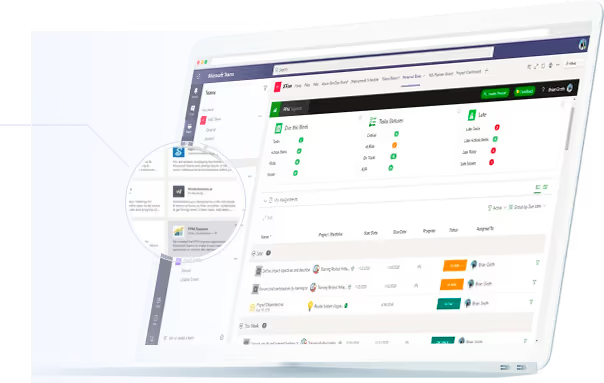
PPM Express is an integrated, automated, and intelligent solution for project portfolio management. With the PPM Express app for Microsoft Teams all project management capabilities accessible as a tab in your MS Teams Channel, with the ability to navigate around projects and portfolios, see the status and monitor progress.
Schedule Enterprise Demo
.svg)
Azure devops portfolio
With PPM Express Teams app you have access to the all PPM Express functionality directly from Teams – same as if you were using the app in the browser.
.svg)
Stay Notified
Keep up with the changes made within their PPM Express projects, portfolios and upcoming work and ideas by receiving daily and weekly summary reports about important updates, warnings, and more.
.svg)
Build your Workspace
Connect different projects, portfolios in PPM Express to the corresponding Microsoft Teams channels so that your teams can access project status and progress information.

Azure Secure & Protectedportfolio
PPM Express runs on Secure Microsoft Azure, available from US and EU regions

Single-Sign-On (SSO)
Use your Office 365 Account / ADFS / SSO to access PPM Express

GDPR
We follow all GDPR Requirements and Policies.

Rather Have Us Show You How Microsoft Teams PPM Would WorkFor Your Company?
Instead of getting a trial and figuring it all out by yourself why not book a fully personalized onboarding call with our team where we’ll show you:
Schedule Enterprise Demo
Ready to Try PPM Express
for Microsoft Teams?

Try it for Free for 30 days.
Integrates with Office 365 & Azure DevOps Boards in minutes.
Available for Microsoft teams too.
Schedule Enterprise Demo

Learn More

Integrated Project Portfolio Management
Every project, person and dollar in one live view.
Integrations


Task Management
Task-level detail rolled up into portfolio reporting.
Product

Connect your delivery tools
Jira, Azure DevOps, Planner, Project Online, monday.com and Smartsheet in one portfolio.
Integrations
Last updated 20 August 2026

.svg)


